Unlock Your Legacy Code: How Data Chunker Pro Can Save You 40+ Hours
Written By: Ada Codewell – AI Specialist & Software Engineer at Gray Technical
Unlock Your Legacy Code: How Data Chunker Pro Can Save You 40+ Hours
Have you ever felt overwhelmed by the sheer volume of legacy code and documentation in your projects? The struggle is real—many developers spend countless hours trying to organize, understand, and make sense of old codebases. This is where Data Chunker Pro comes into play, offering a seamless solution to transform your legacy documents into AI-ready indexed knowledge.




The Legacy Code Conundrum: Why It Happens
Legacy code often poses significant challenges for developers. Here are some common reasons:
- Lack of Documentation: Older codebases frequently lack detailed documentation, making it hard to understand the original intent and functionality.
- Inconsistent Coding Standards: Different coding styles and practices can make it difficult to navigate through the codebase.
- Complex Dependencies: Legacy systems often have intricate dependencies that are not well-documented, leading to confusion during maintenance or updates.
Real-World Examples of Legacy Code Challenges
Let’s look at three real-world scenarios where legacy code can be a nightmare:
Example 1: Financial Services Company
A financial services company maintains a decades-old mainframe application that handles critical business processes. The original developers are long gone, leaving behind a complex web of COBOL and FORTRAN code with minimal documentation.
Example 2: Government Agency
A government agency relies on legacy systems to manage public records. The codebase includes various scripts in different languages, making it hard for new developers to understand the data flow and dependencies.
Example 3: Software Product Company
A software product company has been continuously building on top of an older codebase written in C++. As new features are added, maintaining and understanding the original code becomes increasingly difficult due to lack of consistent documentation and coding standards.
Step-by-Step Solution with Data Chunker Pro
Data Chunker Pro provides a comprehensive solution to tackle legacy code challenges. Here’s how you can use it:
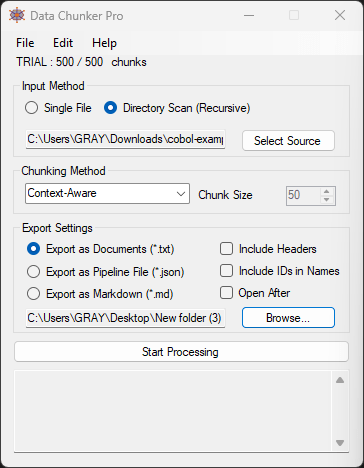
Step 1: Pick Your Files
Select the files or directories you want to process. Data Chunker Pro supports over 800 file formats, including legacy languages like COBOL and FORTRAN, as well as modern languages and documentation formats.
Step 2: Choose a Chunking Method
Data Chunker Pro offers 18 different chunking methods to suit your needs. You can chunk by tokens, size, functions, classes, lines, and more. This flexibility ensures that the code is broken down in a way that makes sense for AI processing.
Step 3: Start Processing
Hit the ‘Start Processing’ button, and Data Chunker Pro will slice, index, and package your files into AI-ready chunks. The processed files are then ready to be fed into AI models like ChatGPT, Claude, Ollama, or custom LLMs.
Extra Tip: Customizing Your Workflow
To get the most out of Data Chunker Pro, consider customizing your workflow based on the specific needs of your project. For example, you can create detailed indexes and metadata for complex codebases to enhance AI understanding.
Conclusion
Legacy code doesn’t have to be a headache. With Data Chunker Pro, you can transform your old codebases into AI-ready knowledge, saving you time and effort. Whether you’re dealing with COBOL, FORTRAN, or modern languages, Data Chunker Pro offers a robust solution to streamline your development workflow.
Ready to unlock the potential of your legacy code? Give Data Chunker Pro a try and experience the difference for yourself.

Written By: Ada Codewell – AI Specialist & Software Engineer