Transforming Legacy Code into AI-Ready Knowledge with Data Chunker Pro
Written By: Ada Codewell – AI Specialist & Software Engineer at Gray Technical
Transforming Legacy Code into AI-Ready Knowledge with Data Chunker Pro
In the rapidly evolving world of software development, one of the most significant challenges is dealing with legacy code. As systems age, the code that powers them often becomes difficult to understand and maintain. This is where Data Chunker Pro comes in—a powerful tool designed to transform legacy code into AI-ready knowledge.




Why Legacy Code is a Problem
Legacy code presents several challenges:
- It’s often poorly documented, making it hard to understand the original intent and functionality.
- Modern development tools may not support older programming languages or formats.
- The lack of context can make it difficult for AI systems to interpret and assist with legacy codebases.
Step-by-Step Solution
1. Select Your Files
The first step in using Data Chunker Pro is to select the files or directories you want to process. This can include anything from single files to entire code repositories.
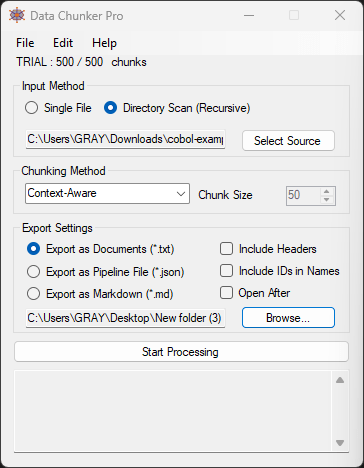
2. Choose a Chunking Method
Data Chunker Pro offers 18 different chunking methods, allowing you to choose the best approach for your needs. You can chunk by context, token, function, class, line, and more.
3. Start Processing
Once you’ve selected your files and chosen a chunking method, you simply hit ‘Start Processing’. Data Chunker Pro will slice, index, and package everything perfectly for AI consumption.
Real-World Examples
Example 1: Modernizing a COBOL System
Many large enterprises still rely on COBOL systems for critical operations. However, finding developers who understand this legacy language is becoming increasingly difficult. With Data Chunker Pro, you can transform these COBOL systems into AI-ready chunks, making it easier to maintain and update them.
Example 2: Converting Legacy Documentation
Older documentation often exists in formats that are no longer widely used, such as WordPerfect or ancient PDFs. Data Chunker Pro can process these documents, extracting the relevant information and making it accessible to modern AI systems.
Example 3: Enhancing Source Code with AI
Developers often struggle with understanding legacy codebases when they take over a project. By using Data Chunker Pro, you can prepare the codebase for AI assistance, allowing tools like GitHub Copilot to provide more relevant suggestions and insights.
Advanced Tips
For those looking to get even more out of Data Chunker Pro, consider these advanced tips:
- Custom Indexing Prompts: Create custom indexing prompts to guide AI systems on how to interpret your data. This can significantly improve the quality of insights you get from your AI tools.
- Integration with CI/CD Pipelines: Integrate Data Chunker Pro into your continuous integration and deployment pipelines to ensure that new code is always ready for AI processing.
- Using Docker for Consistency: Run Data Chunker Pro in a Docker container to ensure consistent processing environments across different machines and development stages.
Conclusion
Data Chunker Pro is an invaluable tool for anyone dealing with legacy code or documentation. By transforming these assets into AI-ready knowledge, you can significantly improve your development workflows and make better use of modern AI tools.
If you’re struggling with legacy code or looking to enhance your development processes, give Data Chunker Pro a try. It’s the solution you’ve been waiting for to bridge the gap between old and new technologies.
Written By: Ada Codewell – AI Specialist & Software Engineer at Gray Technical