Transforming Legacy Code into AI Knowledge with Data Chunker Pro
Written By: Ada Codewell – AI Specialist & Software Engineer at Gray Technical
Transforming Legacy Code into AI Knowledge with Data Chunker Pro
As software engineers and developers, we often inherit legacy codebases that are difficult to understand and maintain. These codebases can be written in outdated languages, lack proper documentation, or have complex structures that make it hard for modern development tools to process them effectively. This is where Data Chunker Pro comes into play, a powerful tool designed to transform any file or directory into AI-ready indexed knowledge.
Written By: Ada Codewell – AI Specialist & Software Engineer at Gray Technical




Why Legacy Code is a Challenge for Modern Development Tools
Legacy code presents several challenges for modern development tools:
- Outdated languages and formats: Legacy systems often use programming languages like COBOL, FORTRAN, or assembly language, which are not well-supported by modern AI coding assistants.
- Lack of documentation: Older codebases frequently lack comprehensive documentation, making it difficult for developers to understand the system’s functionality and architecture.
- Complex structures: Legacy systems may have complex interdependencies and structures that are challenging to analyze using standard tools.
These challenges can significantly slow down development processes, increase the risk of errors, and make it difficult to leverage modern AI tools for code analysis and assistance.
Step-by-Step Solution: How Data Chunker Pro Transforms Legacy Code into AI Knowledge
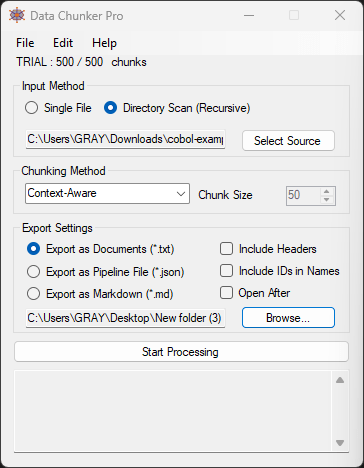
1. Pick Your Files
Data Chunker Pro supports over 800 file formats, including all major code languages (from Python to COBOL), Microsoft and Google office documents, legacy systems, enterprise data formats, documentation, and media. You can process single files or entire directories with no size limits.

2. Select a Chunk Method
Data Chunker Pro offers 18 AI-optimized chunking methods, allowing you to choose the most appropriate way to divide your code or documents:
- By tokens: Splits files based on token count, ideal for natural language processing tasks.
- By size: Divides files into chunks of a specific size, useful for large datasets.
- By sections, lines, functions, or classes: Organizes code based on its logical structure, preserving context and relationships.
3. Start Processing
Once you’ve selected your files and chunking method, simply hit ‘Start Processing’. Data Chunker Pro will slice, index, and package everything perfectly for AI knowledge bases.
4. Integrate with AI Tools
Data Chunker Pro’s output is automatically ready for popular AI tools like ChatGPT, Claude, Ollama, Open WebUI, or custom LLMs. The generated chunks include metadata and indexing, allowing AI systems to understand and utilize your codebase effectively.
Real-World Examples: How Developers Use Data Chunker Pro
Example 1: Modernizing a COBOL Mainframe System
A large financial institution needed to modernize its COBOL mainframe system but struggled with the lack of documentation and complex code structure. Using Data Chunker Pro, they were able to:
- Process the entire COBOL codebase, including JCL and DB2 files.
- Chunk the code by functions and classes to preserve context.
- Integrate the processed chunks with an AI coding assistant to generate documentation and suggest modernizations.
Example 2: Revitalizing an Abandoned Open-Source Project
An open-source project written in FORTRAN had been abandoned for years. A group of volunteers wanted to revive it but found the code difficult to understand. With Data Chunker Pro, they:
- Chunked the codebase by sections and functions.
- Used the processed chunks to train a custom LLM on the project’s domain.
- Leveraged the AI model to suggest improvements and generate missing documentation.
Example 3: Creating an AI-Powered Knowledge Base for a Legacy Codebase
A software company wanted to create an AI-powered knowledge base for its legacy codebase, which included code written in various languages like C, VB, and assembly. Using Data Chunker Pro, they:
- Processed the entire codebase with different chunking methods tailored to each language.
- Generated a comprehensive index of all code chunks.
- Integrated the indexed chunks with a RAG (Retrieval-Augmented Generation) system to create an intelligent knowledge base.
Advanced Tip: Optimizing Chunk Size for AI Processing
When working with large codebases, it’s essential to optimize chunk size for efficient AI processing. Data Chunker Pro allows you to customize chunk sizes between 500-10,000 tokens. Here are some guidelines:
- Small chunks (500-1,000 tokens): Ideal for detailed code analysis and fine-grained understanding of specific functions or classes.
- Medium chunks (2,000-5,000 tokens): Suitable for most use cases, balancing context preservation and processing efficiency.
- Large chunks (5,000-10,000 tokens): Useful for understanding complex code structures or long documentation sections, but may require more computational resources.
Conclusion
Data Chunker Pro is a game-changer for developers and enterprises struggling with legacy codebases. By transforming complex, outdated code into AI-ready indexed knowledge, it enables modern development workflows, improves code understanding, and unlocks the potential of AI coding assistants.
If you’re dealing with legacy code or looking to create custom datasets for AI training, give Data Chunker Pro a try. With its free beta tester program, you can start processing up to 500 chunks per month at no cost.
Don’t let legacy code hold you back – turn it into an asset with Data Chunker Pro!