How to Turn Legacy Code into AI-Compatible Knowledge with Data Chunker Pro
Written By: Ada Codewell – AI Specialist & Software Engineer at Gray Technical
How to Turn Legacy Code into AI-Compatible Knowledge with Data Chunker Pro
If you’re working with legacy codebases or large datasets, you know how challenging it can be to make them accessible for modern AI tools. Enter Data Chunker Pro, a powerful tool that transforms your files into AI-compatible chunks. In this article, we’ll explore how Data Chunker Pro solves the problem of making legacy code and data usable for AI applications.




Why This Problem Happens
Legacy code and data are often in formats that modern AI tools can’t easily understand or process. Whether it’s due to outdated file formats, lack of proper documentation, or the sheer volume of data, these challenges make it difficult to leverage AI for analysis, understanding, or enhancement.
Real-World Examples
Here are three real-world scenarios where this problem occurs:
Example 1: Legacy Mainframe Systems
Many enterprises still rely on mainframe systems that run COBOL, FORTRAN, or other legacy languages. These systems contain valuable business logic and data but are difficult to integrate with modern AI tools. Without a way to chunk and index this code, it remains inaccessible for AI-driven insights.
Example 2: Large Codebases
Software development teams often have large codebases that span multiple languages and frameworks. Making sense of these codebases using AI can be daunting without a tool to organize and chunk the code into manageable pieces.
Example 3: Documentation and Knowledge Bases
Technical documentation, user manuals, and knowledge bases are often scattered across various formats and locations. Consolidating this information into a format that AI can understand requires significant effort without the right tools.
Step-by-Step Solution with Data Chunker Pro
Data Chunker Pro offers a comprehensive solution to these challenges. Here’s how you can use it to turn your legacy code and data into AI-compatible knowledge:
Step 1: Pick Your Files
Select the files or directories you want to process. Data Chunker Pro supports over 800 file formats, including C#, COBOL, FORTRAN, SQL, Markdown, and more. You can choose single files or entire directories with no size limits.
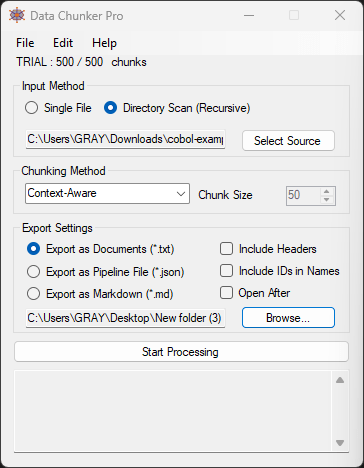
Step 2: Select a Chunk Method
Choose from 18 different chunking methods optimized for AI processing. You can chunk by tokens, size, sections, lines, functions, classes, and more. This flexibility ensures that you can tailor the chunking process to your specific needs.
Step 3: Start Processing
Click ‘Start Processing’ to let Data Chunker Pro slice, index, and package your files into AI-ready chunks. The tool automatically generates an index file that helps AI tools understand the structure and context of your data.
Extra Tip: Using Index Files for Better AI Understanding
Data Chunker Pro creates index files (index.json, index.md, or index.txt) that contain metadata about your chunks. These files help AI tools understand the organization of your data before answering questions. For example, you can instruct your AI to look for these index files first, ensuring it has the necessary context to provide accurate responses.
Sample Indexing Prompt – Open WebUI with Ollama:
With uploaded documents ALWAYS look for and read the “index.json” file first. If “index.json” is not available, then look for “index.md” or “index.txt” instead. These files will contain the project structure and chunk metadata.
Conclusion
Data Chunker Pro is a game-changer for anyone dealing with legacy code and data. It turns complex, unstructured information into AI-compatible knowledge, making it easier to leverage modern AI tools for analysis and enhancement. Whether you’re working with mainframe systems, large codebases, or technical documentation, Data Chunker Pro has you covered.
Ready to transform your legacy code and data into AI-ready chunks? Try Data Chunker Pro today and experience the difference for yourself.
Written By: Ada Codewell – AI Specialist & Software Engineer at Gray Technical