Guardian Suite
Complete AI oversight with automated safety monitoring that detects threats in real-time and alerts staff before tragedy strikes.
Monitor, protect, and manage your AI deployment—all while maintaining complete data privacy.
[Start 30-Day Free Trial] [Watch Silent Alert Demo]
What’s Included
Guardian Suite gives you seven enterprise-grade tools for complete visibility, control, and safety across your AI deployment.
1. Silent Alert
AI-powered safety monitoring.
How it works:
- Monitors all AI conversations in real-time
- Detects concerning content (threats, self-harm, violence, abuse)
- Uses AI context analysis—not just dumb keyword matching
- Assigns severity ratings (1-10 scale) to each flagged conversation
- Automatically alerts designated staff with full conversation context
- Engages user naturally while help is dispatched
What it tries to catches:
- Suicide threats and self-harm indicators
- Violence and weapon references (with context awareness)
- Abuse disclosures
- Drug and substance concerns
- Bullying and harassment
- Crisis situations requiring immediate intervention
Why it’s better than GoGuardian/Bark:
- Context-aware AI (not keyword triggers)
- 90% fewer false positives
- Integrated with the AI students actually use
- Fully offline—no third-party monitoring service
Perfect for: Student safety, compliance officers, crisis prevention
2. Chat Intelligence
Automated backup, analysis, and insights from all AI conversations.
Daily automated processes:
- Backs up all user chat logs to secure location
- Analyzes conversation patterns and usage trends
- Identifies which users/groups are most active
- Detects unusual behavior or policy violations
- Generates overview reports for administrators
- Tracks engagement metrics across your organization
Insights you’ll get:
- Top conversation topics and use cases
- User adoption rates by department/grade
- Peak usage times and patterns
- Content that needs attention
- Compliance audit trails
Perfect for: IT administrators, compliance tracking, usage analytics
3. Report Engine
Transform chat logs into professional reports and transcripts.
Multiple output formats:
- Timestamped transcripts: Screenplay-style conversation records
- Executive summaries: Key points and decisions from conversations
- PDF-ready reports: Formatted for board meetings and documentation
- Compliance reports: Audit-ready conversation logs
- Training materials: Anonymized examples for staff development
Configurable templates:
- Customize report structure
- Filter by user, date range, or topic
- Redact sensitive information automatically
- Export to multiple formats
Perfect for: Administrative reporting, compliance documentation, training
4. Data Vision
Visual analytics and dashboards for decision-makers.
Automatically generates:
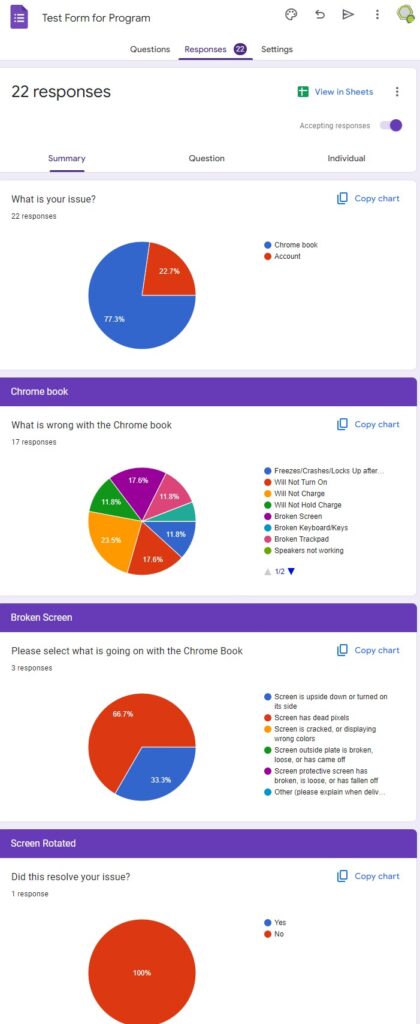
- Usage graphs and trend charts
- User activity heatmaps
- Department/grade-level comparisons
- Spreadsheet exports with auto-generated visualizations
- Executive dashboards for leadership
See at a glance:
- Who’s using AI (and who isn’t)
- What they’re using it for
- When usage spikes or drops
- Where to focus training efforts
Perfect for: Leadership teams, data-driven decision making
5. AI Backup Tool
Automated, bulletproof backups of your entire AI system.
What gets backed up:
- Docker containers and configurations
- All chat logs and conversation history
- User profiles and permissions
- Custom models and prompts
- System settings and workflows
Backup features:
- Scheduled automatic backups (daily, weekly, custom)
- Email notifications on completion or errors
- Configurable retention policies
- One-click restore if disaster strikes
- Incremental backups to save storage
Perfect for: Disaster recovery, IT peace of mind, compliance requirements
6. UserSync
Streamlined user management across your AI platform.
Manage users efficiently:
- Bulk user creation and deletion
- Group and role assignments
- Permission management
- User profile updates
- Account provisioning and deprovisioning
- Integration with existing directory services
Automation features:
- Sync with student information systems
- Automated onboarding for new users
- End-of-year cleanup workflows
- Role transitions (student → alumni, staff changes)
Perfect for: IT administrators, large deployments, frequent user changes
7. OCR (Optical Character Recognition)
Extract and analyze text from documents and images.
Process documents directly in AI chat:
- Upload PDFs, images, scanned documents
- AI extracts text automatically
- Analyzes content and answers questions
- Works with email attachments
Use cases:
- Process paper forms and surveys
- Digitize legacy documents
- Extract data from screenshots
- Analyze handwritten notes (typed text)
Perfect for: Document processing, data entry automation, accessibility
Why Guardian Suite?
Safety First
✅ Real-time threat detection with AI context awareness
✅ Automated alerts to prevent tragedies
✅ Complete audit trails for investigations
✅ Peace of mind for administrators and parents
Complete Visibility
✅ Know exactly how AI is being used
✅ Identify problems before they escalate
✅ Data-driven insights for leadership
✅ Compliance-ready reporting
Enterprise-Grade Infrastructure
✅ Automated backups prevent data loss
✅ User management at scale
✅ Document processing automation
✅ Professional support included
100% Private
✅ No third-party monitoring services
✅ All processing happens on your servers
✅ Complete data sovereignty
✅ FERPA/HIPAA compliant
Who Needs Guardian Suite?
Schools & Districts
“We need AI for students, but the board requires safety monitoring and full oversight.”
Healthcare Organizations
“HIPAA compliance requires complete audit trails and automated backups of all patient interactions.”
Legal Firms
“We need to track all AI usage for ethics compliance and be able to produce records on demand.”
Any Organization Running AI
“We want the benefits of AI without losing control or visibility into how it’s being used.”
Compare the Costs
| Solution | Annual Cost | What You Get |
|---|---|---|
| GoGuardian | $7,500-15,000 | Monitoring only (no AI) |
| Gaggle/Bark | $10,000-20,000 | Keyword monitoring (many false positives) |
| Microsoft Compliance | $15,000+ | Cloud-based, data leaves your control |
| Guardian Suite | $3,995 one-time | AI monitoring + backups + analytics + management |
Plus: Guardian Suite integrates directly with your AI—competitors don’t.
Silent Alert in Action
Scenario: Crisis Prevention
3:47 PM – Student conversation flagged
Student: "I don't want to be here anymore.
Nobody would care if I was gone."
What happens:
- Silent Alert detects concerning language
- Full conversation sent to secondary AI for analysis
- Severity rating: 9/10 – Immediate intervention required
- Principal and counselor receive instant alert with:
- Student name and contact info
- Full conversation context
- Recommended actions
- AI keeps student engaged: “That sounds really hard. Can you tell me more about what’s going on?”
- Staff reaches student within 5 minutes
Without Silent Alert: Conversation goes unnoticed. No intervention.
With Silent Alert: Early intervention, student gets help, potential tragedy prevented.
Real-World Use Cases
For Schools:
- Monitor student AI usage for safety concerns
- Track which teachers are adopting AI
- Generate reports for school board meetings
- Ensure backups for accidental deletions
- Manage 500+ student accounts efficiently
For Healthcare:
- Audit trails for HIPAA compliance
- Monitor staff AI usage with patient data
- Automated backups of clinical documentation
- Analyze conversation patterns for quality improvement
For Legal:
- Ethics compliance tracking
- Client interaction records
- Billable time insights from AI usage
- Disaster recovery for case files
Technical Specs
Deployment: N8N workflows + Open WebUI functions
Installation: Included in Docker Compose (auto-configured)
Storage Requirements: 100GB+ recommended for logs
Alert Methods: Email, SMS (via webhook), custom integrations
Backup Schedule: Configurable (default: nightly)
Works alongside Core AI Suite or standalone with your existing AI.
What’s NOT Included
Guardian Suite focuses on monitoring, safety, and management. It does not include:
- Student/teacher AI assistants (see Core AI Suite)
- Workflow automation (see AutoFlow Suite)
- Scheduling tools (see Schedule Pro)
Want everything? Check out our Complete Platform Bundle and save $2,490.
Frequently Asked Questions
Q: Can Silent Alert miss a threat?
Yes. No system is perfect. Silent Alert assists human judgment—it doesn’t replace existing safety protocols. Schools must maintain response procedures.
Q: How many false alerts will we get?
Expect 2-5 real alerts per month (500 students). False positives are rare due to AI context analysis, but will occur occasionally.
Q: Is Silent Alert legal?
If your school already has monitoring policies and parental consent (like for GoGuardian), yes. We provide implementation guides and policy templates. Consult your school attorney.
Q: What if someone accesses a flagged conversation?
Full audit logs track who viewed what and when. Administrators control access permissions.
Q: Can we customize alert sensitivity?
Yes. You set thresholds for what triggers alerts and who receives them.
Q: Do we need Core AI Suite to use Guardian Suite?
Not required, but recommended. Guardian Suite can monitor any Open WebUI installation.
Legal & Liability
Guardian Suite is a tool that assists your existing safety protocols—it does not replace them.
Your organization remains responsible for:
- Having student/employee monitoring policies in place
- Obtaining proper parental/user consent
- Maintaining response procedures
- Staff training on alert protocols
We provide:
- Implementation guidance
- Policy templates
- Best practices documentation
- Technical support
Guardian Suite is sold with explicit liability limitations. See terms of service for details.
Ready to Deploy Complete AI Oversight?
30-Day Free Trial
Test Guardian Suite with your team risk-free.
Includes full Silent Alert functionality.
[Start Free Trial]
See Silent Alert in Action
Watch our demo of threat detection and staff alerting.
[Watch Demo Video]
Implementation Consultation
Discuss your safety policies and compliance needs.
[Schedule a Call]
Add-Ons & Support
Extended Support – $1,995/year
Priority assistance, quarterly updates, configuration help
White-Glove Installation – $2,500
We install and configure everything remotely, train your staff
Custom Integration – Quote
Connect Guardian Suite to your existing systems
Gray Technical, LLC
Privacy-first AI infrastructure for education, healthcare, and business
[View All Products] | [Documentation] | [Contact Support]