
Transforming Raw XYZ Data into Interactive 3D Graphs in Excel
Written By: Ada Codewell – AI Specialist & Software Engineer at Gray Technical
Transforming Raw XYZ Data into Interactive 3D Graphs in Excel
Are you struggling to visualize complex data sets in Excel? You’re not alone. Creating accurate and interactive 3D graphs from raw XYZ data can be a frustrating task, especially when Excel’s native tools fall short. This is where XYZ Mesh comes to the rescue.

Why This Problem Happens
Excel is a powerful tool for data analysis, but it wasn’t designed to handle complex 3D visualizations. When dealing with XYZ data—where each point in space is defined by three coordinates (X, Y, Z)—Excel’s basic charting tools often fail to provide the depth and interactivity needed for comprehensive analysis.
This limitation can be a significant barrier for professionals in fields like geology, engineering, or scientific research, where accurate 3D visualization is crucial. The need for a solution that can seamlessly convert raw XYZ data into interactive 3D graphs within Excel is more pressing than ever.
Step-by-Step Solution
XYZ Mesh offers a straightforward and efficient way to turn raw XYZ data into interactive 3D graphs directly in Excel. Here’s how you can do it:
Step 1: Install XYZ Mesh
First, download and install XYZ Mesh. The software is compatible with Windows 7 and newer versions, ensuring smooth operation on most modern systems.
Step 2: Prepare Your Data
Gather your raw XYZ data. This data should be in a simple tabular format with columns for X, Y, and Z coordinates. Ensure that your data is clean and free of errors to avoid any issues during conversion.
Step 3: Import Data into XYZ Mesh
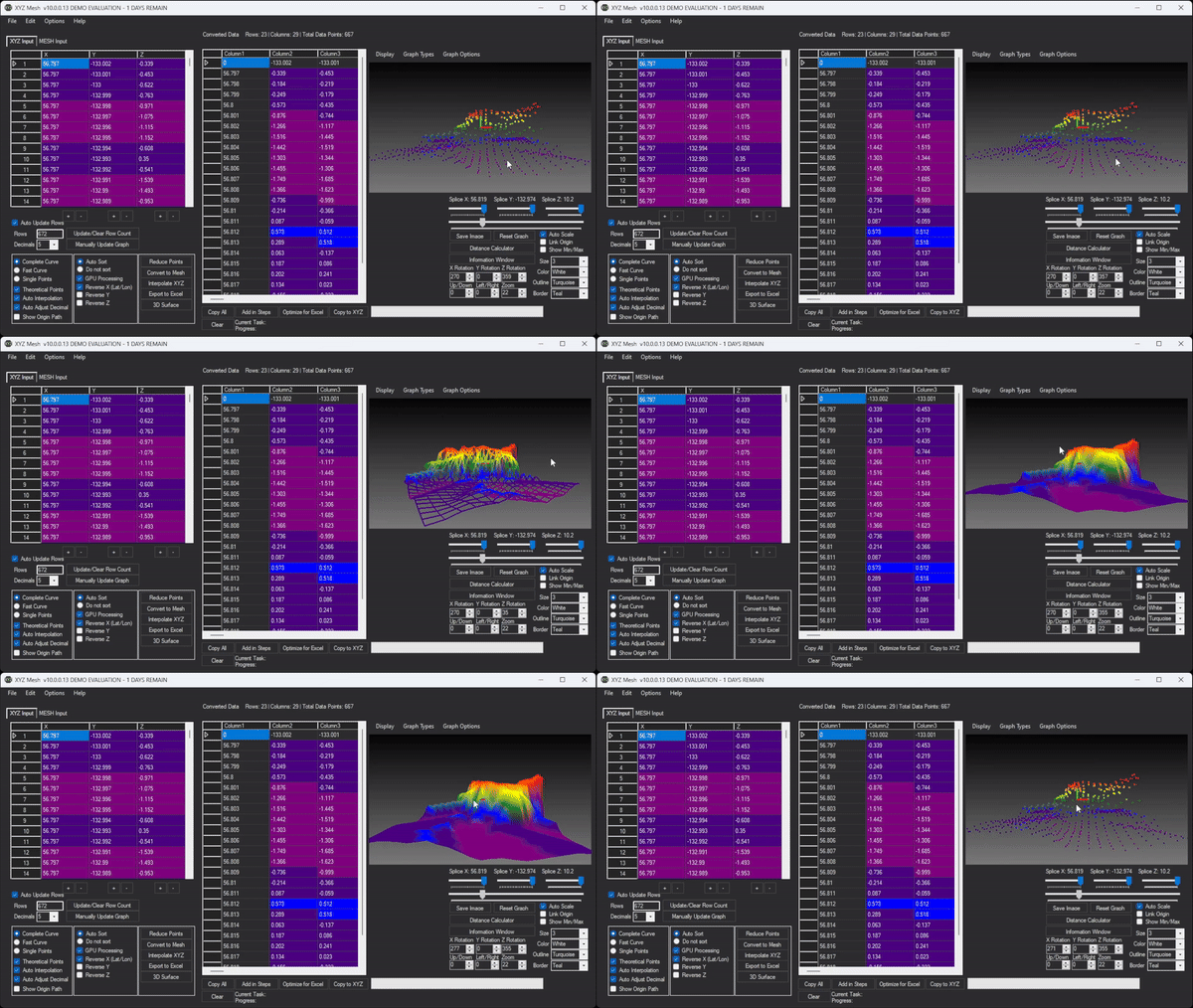
Open XYZ Mesh and paste your XYZ data into the input tab. The software will automatically recognize the data format and begin processing it for visualization.

Step 4: Convert to MESH
Use the “Convert to Mesh” feature in XYZ Mesh to transform your raw XYZ data into a MESH format. This step is crucial as it allows for more accurate and detailed 3D visualization.
Step 5: Customize Your Graph
XYZ Mesh offers various customization options to enhance your graph. You can adjust colors, add theoretical points to fill in gaps, and optimize the data for Excel’s limitations. These features ensure that your graph is both accurate and visually appealing.
Step 6: Export to Excel
Once you’re satisfied with your graph, use the “Export to Excel” feature to generate a fully interactive 3D graph directly in Excel. The exported file will include all data, graphs, and plots, making it easy to share with colleagues or clients.

Real-World Examples
Let’s explore some real-world scenarios where XYZ Mesh has made a significant impact:
Example 1: Geological Surveying
A geologist needs to visualize subsurface geological formations for a mining project. Using XYZ Mesh, they can convert raw survey data into detailed 3D models, allowing them to identify mineral deposits and plan excavation strategies more effectively.
Example 2: Oceanic Farming
An oceanographer is studying the impact of water currents on marine life. By converting XYZ data from oceanographic sensors into interactive 3D graphs, they can analyze patterns and trends that would be impossible to see with traditional 2D charts.
Example 3: Conservation Efforts
A conservationist is monitoring the changes in a forest’s canopy over time. Using XYZ Mesh, they can create detailed 3D models of the forest, tracking changes in tree heights and densities to assess the impact of environmental factors.
Extra Tip: Advanced Customization
For users needing more advanced customization, XYZ Mesh offers features like paraboloid creation and custom company branding on Excel exports. These options are particularly useful for businesses that need to present data in a professional and branded format.
Conclusion
XYZ Mesh is a game-changer for anyone needing to visualize complex XYZ data in Excel. Its user-friendly interface, powerful features, and seamless integration with Excel make it an invaluable tool for professionals across various fields.
Ready to transform your data visualization? Download the free trial of XYZ Mesh today and experience the difference for yourself!





Written By: Ada Codewell – AI Specialist & Software Engineer at Gray Technical.



















