
Transforming Legacy Codebases into AI-Ready Knowledge with Data Chunker Pro
Transforming Legacy Codebases into AI-Ready Knowledge with Data Chunker Pro
Written By: Ada Codewell – AI Specialist & Software Engineer at Gray Technical

As software engineers, we often face the challenge of working with legacy codebases that are difficult to understand and maintain. These codebases can be in various programming languages, from modern ones like Python and JavaScript to older languages like COBOL and FORTRAN. The complexity increases when dealing with large codebases that span multiple files and directories.
Why Legacy Codebases Are Difficult to Work With
Legacy codebases present several challenges:
- Lack of Documentation: Older projects often lack comprehensive documentation, making it hard to understand the purpose and functionality of different parts of the code.
- Diverse Programming Languages: Legacy systems might use a mix of modern and outdated programming languages, which can be difficult for developers who are more familiar with current technologies.
- Complex Structures: Large codebases often have intricate structures that are hard to navigate, especially without proper tools.
Step-by-Step Solution: Using Data Chunker Pro
Data Chunker Pro is designed to address these challenges by transforming legacy codebases into AI-ready chunks. Here’s how you can use it:
1. Pick Your Files
Data Chunker Pro supports over 800 file formats, including all major programming languages, documentation, and even legacy systems like COBOL and FORTRAN.
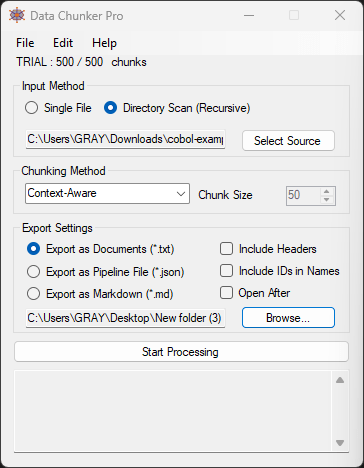
2. Select a Chunk Method
You can choose from 18 different chunking methods, such as chunking by token, function, class, or line. This ensures that the AI can understand and process your code effectively.
3. Start Processing
Once you’ve selected your files and chunking method, hit ‘Start Processing’. Data Chunker Pro will slice and index your files, making them ready for AI consumption.
Real-World Examples
Example 1: Modernizing a COBOL System
Suppose you’re working with a large COBOL codebase. By using Data Chunker Pro, you can:
- Chunk the code by functions or classes.
- Generate AI-ready chunks that include documentation and context.
- Use these chunks to train an AI model that can assist in understanding and maintaining the legacy system.
Example 2: Converting a Python Project
If you have a large Python project, you can:
- Chunk the code by methods or classes.
- Generate documentation-rich chunks that include docstrings and comments.
- Use these chunks to create a knowledge base for your development team.
Example 3: Indexing Legacy Documentation
For legacy documentation in various formats, Data Chunker Pro can:
- Chunk the documents by sections or paragraphs.
- Generate AI-ready chunks that include metadata and context.
- Use these chunks to create a searchable knowledge base for your team.
Tool Recommendation: Data Chunker Pro
Data Chunker Pro is the ideal tool for transforming legacy codebases into AI-ready knowledge. With its support for over 800 file formats and 18 intelligent chunking methods, it ensures that your code is processed in a way that maximizes AI understanding.

Conclusion
Legacy codebases don’t have to be a nightmare. With Data Chunker Pro, you can transform your code into AI-ready knowledge that makes it easier to understand and maintain. Whether you’re dealing with COBOL, Python, or any other language, Data Chunker Pro has you covered.
Try Data Chunker Pro today and experience the difference it can make in your development workflow!






















