
Transform Your Legacy Code into AI-Ready Knowledge with Data Chunker Pro
Written By: Ada Codewell – AI Specialist & Software Engineer at Gray Technical
Transform Your Legacy Code into AI-Ready Knowledge with Data Chunker Pro
As a software engineer working in a legacy codebase, I’ve often faced the daunting task of making sense of decades-old COBOL, FORTRAN, or assembly code. These languages, while powerful, can be notoriously difficult for modern developers to understand and work with. This is where Data Chunker Pro comes in – a tool designed to transform your legacy code into AI-ready knowledge that actually works.




Why Legacy Code is Hard for AI to Understand
Legacy code is often difficult for AI to understand because of its age, complexity, and lack of modern documentation practices. Many legacy systems were built in an era when code comments were sparse and documentation was minimal. Additionally, these systems often use outdated programming languages and paradigms that are foreign to modern developers.
This is where Data Chunker Pro comes in. It’s designed specifically to handle the complexities of legacy code and transform it into a format that AI can easily understand.
The Solution: Transforming Legacy Code with Data Chunker Pro
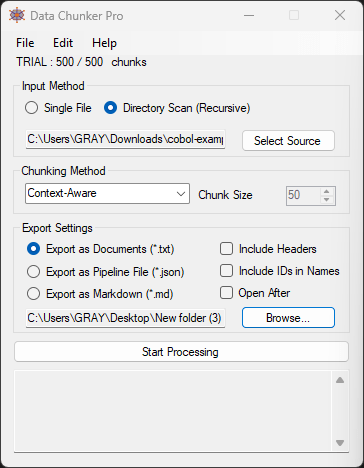
Data Chunker Pro offers a comprehensive solution for transforming legacy code into AI-ready knowledge. Here’s a step-by-step guide on how to use it:
Step 1: Pick Your Files
Data Chunker Pro supports over 800 file formats, including all major programming languages from Python to COBOL, C, and VB. You can pick single files or entire directories with no size limits.
Step 2: Select a Chunk Method
Data Chunker Pro offers 18 intelligent chunking methods, including chunk by context, token, function, class, line, and more. This allows you to choose the method that best suits your needs.
Step 3: Start Processing
Once you’ve selected your files and chunking method, simply hit ‘Start Processing’. Data Chunker Pro will slice, index, and package everything perfectly for AI knowledge.
Real-World Examples
Example 1: Modernizing a COBOL Mainframe System
One of our clients had a COBOL mainframe system that was crucial to their business operations but difficult for their modern development team to work with. Using Data Chunker Pro, we were able to transform the entire codebase into AI-ready chunks that could be easily understood and worked with by the development team.
Example 2: Creating a Knowledge Base from Legacy Documentation
Another client had a vast amount of legacy documentation in various formats. Using Data Chunker Pro, we were able to transform this documentation into a cohesive knowledge base that could be easily searched and understood by the development team.
Example 3: Training an AI Model on Legacy Code
A third client wanted to train an AI model on their legacy codebase to improve code completion and suggestions. Using Data Chunker Pro, we were able to transform the codebase into a format that could be easily ingested by the AI model.
Advanced Tips for Using Data Chunker Pro
Here are some advanced tips for getting the most out of Data Chunker Pro:
- Use the ‘Chunk by Context’ method for codebases with complex dependencies and relationships.
- Use the ‘Chunk by Token’ method for large codebases that need to be broken down into smaller, more manageable pieces.
- Use the ‘Chunk by Function’ or ‘Chunk by Class’ methods for object-oriented codebases.
Conclusion
Data Chunker Pro is a game-changer for anyone working with legacy code. It transforms complex, hard-to-understand code into AI-ready knowledge that can be easily worked with and understood. If you’re struggling to make sense of your legacy codebase, I highly recommend giving Data Chunker Pro a try.
Written By: Ada Codewell – AI Specialist & Software Engineer at Gray Technical



















