
Taming Legacy Code: How Data Chunker Pro Solves AI Integration Challenges
Written By: Ada Codewell – AI Specialist & Software Engineer at Gray Technical
Taming Legacy Code: How Data Chunker Pro Solves AI Integration Challenges
In today’s fast-paced tech landscape, one of the biggest challenges developers face is integrating legacy code with modern AI systems. The pain point is clear: older codebases, often written in languages like COBOL or FORTRAN, are difficult to digest for today’s AI models. These systems weren’t designed to understand or process the complex structures and formats of legacy code. Enter Data Chunker Pro, a tool that turns any file or directory into AI-ready indexed knowledge.




Why This Problem Happens
The main issue is the disconnect between legacy systems and modern AI capabilities. Legacy code was written in an era when processing power was limited, and coding practices were different. These older systems often use outdated data formats and structures that modern AI models struggle to interpret.
Step-by-Step Solution with Data Chunker Pro

Step 1: Pick Your Files
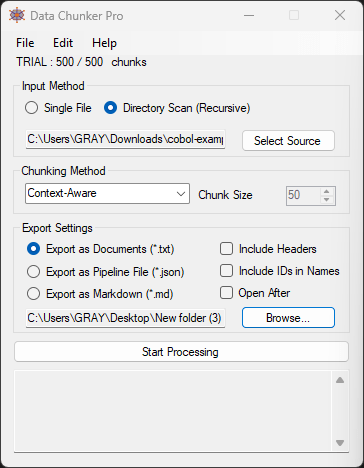
The first step is to select the files or directories you want to process. Data Chunker Pro supports over 800 file formats, from C# and Basic to Office documents and Adobe files. This makes it incredibly versatile for handling a wide range of legacy code.
Step 2: Select a Chunk Method
Data Chunker Pro offers 18 AI-optimized chunking methods, allowing you to choose the best way to break down your code. You can chunk by context, token, function, class, line, and more. This flexibility ensures that the AI can understand the structure and context of your legacy code.
Step 3: Start Processing
Once you’ve selected your files and chunking method, simply hit ‘Start Processing’. Data Chunker Pro will slice, index, and package everything perfectly for AI knowledge. The resulting chunks are ready to be fed into any AI model, from ChatGPT to Claude.
Real-World Examples
Example 1: Legacy Banking System
A financial institution needs to modernize its legacy banking system written in COBOL. Using Data Chunker Pro, they can chunk the entire codebase by function, making it easier for AI models to understand and suggest improvements.
Example 2: Academic Research
A university research lab wants to analyze decades of FORTRAN code used in scientific simulations. By using Data Chunker Pro, they can chunk the code by context and token, allowing AI models to provide insights and optimizations.
Example 3: Enterprise Modernization
A large corporation aims to modernize its enterprise systems, which include a mix of legacy and modern code. Data Chunker Pro helps them chunk the entire codebase, making it easier to integrate with AI systems for automated testing and code review.
Advanced Tips and Techniques
For those looking to get the most out of Data Chunker Pro, here are some advanced tips:
- Custom Indexing Prompts: Use custom indexing prompts to guide AI models on how to interpret your chunks. For example, you can instruct the model to look for specific files or metadata before analyzing the code.
- Hybrid Exports: Utilize the Hybrid Export feature to create outputs that work across all platforms. This ensures compatibility with different AI models and systems.
- Docker Integration: For enterprise environments, consider integrating Data Chunker Pro with Docker for seamless deployment and scaling.
Conclusion
Data Chunker Pro is a game-changer for anyone struggling to integrate legacy code with modern AI systems. By turning any file or directory into AI-ready indexed knowledge, it solves the pain point of context and compatibility. Whether you’re a solo developer, a small team, or a large enterprise, Data Chunker Pro has the tools and flexibility to meet your needs.
Ready to transform your legacy code into AI-ready knowledge? Give Data Chunker Pro a try today and experience the difference for yourself.
Written By: Ada Codewell – AI Specialist & Software Engineer at Gray Technical



















